A reMarkable embedding of Flutter
Building Pluto to make Flutter belong on e-ink - so you can build your own e-ink apps.
On this page
- Why writing pixels is not enough on e-ink
- A useful first-order physical model
- Four kinds of truth
- The custom Flutter embedder
- Software rendering by design
- The tile pipeline: damage after quantization
- Damage is geometry plus meaning
- A scheduler, not a queue
- The presenter boundary
- qtfb: delegate color, surrender control
- direct SWTCON: own the waveform path
- Rendering color on e-ink requires a different pipeline
- Making pen strokes feel faster without guessing what you will draw
- How it works
- Why e-ink screens need occasional full refreshes
- Automatic Ghostbuster
- Performance: make the policy cheap enough to stay honest
- AOT to run, JIT to build
- Warm app switching without a full reset
- The camera became part of the test rig
- Apps that force the stack to become real
- Pluto Home
- Ink
- Paper Codex
- Building and shipping an app
- What’s next?
- An app ecosystem made for paper
- A virtual optical panel: an e-ink simulator
- A CNC rig for repeatable pen testing
- A local AI workbench
- Primary references
- Pluto implementation notes
I’ve liked reMarkable devices since I first used one, and I’ve been a huge fan of e-ink for even longer. The screens feel calm and deliberate, but I kept looking at the devices I already owned and wondering what else I could make them do. So I started experimenting.
My first experiment was Paper Codex, a private Rust prototype for a paper-native Codex interface. I built its ruled conversation page, handwriting and keyboard modes, pen and touch pipeline, ink renderer, and e-ink refresh logic. It taught me where the simple idea of putting one custom app on a tablet meets the reality of the display.
Then I realised Paper Codex probably would not be my last idea. Rebuilding that stack for every app made no sense. I set the original implementation aside and started Pluto: a reusable platform for building my own e-ink experiences. The original Paper Codex has since returned as a Flutter app running on Pluto.
With Pluto, the goal was no longer to put one custom interface on one tablet. I wanted to run ordinary Flutter apps on e-ink. Not a Flutter-shaped web view, not a screenshot exporter, and not one app hiding inside the stock interface. I wanted a launcher, an app runtime, hot reload, pen and touch, standby, app switching, and eventually an ecosystem of software designed for paper.
That ambition sounded much simpler before I understood what an e-ink pixel actually is.
On an LCD or OLED, the renderer can usually think in frames. Produce the next image, hand it to the display stack, and the old image stops mattering. On an electrophoretic panel, the old image is part of the input to the next one. Pigment has a physical position. A transition is a time sequence of electrical drives selected from a temperature-dependent table. A fast update, a clean text update, and a full color update are materially different operations. The screen keeps showing its last state when the process stops, or when the power goes away.
So Pluto became less like “Flutter for a strange framebuffer” and more like a small display operating system between Flutter’s declarative world and a physical surface with memory.
Pluto is a custom Linux Flutter embedder, a software compositor, an e-ink renderer and scheduler, two presenter paths, a launcher and supervisor, a device CLI, and a growing set of apps. It runs on the reMarkable Paper Pro Move, reMarkable 2, and reMarkable 1. This article follows the Move’s complete direct, boot-first platform: a 7.3-inch, 1696 × 954, 264 ppi Gallery 3 color device with two Cortex-A55 cores. The project is open source at github.com/Salakar/pluto.
This is the engineering story so far: what had to change, which abstractions survived contact with the panel, the bugs that only existed in pigment, and why a camera became part of the test harness.

Why writing pixels is not enough on e-ink
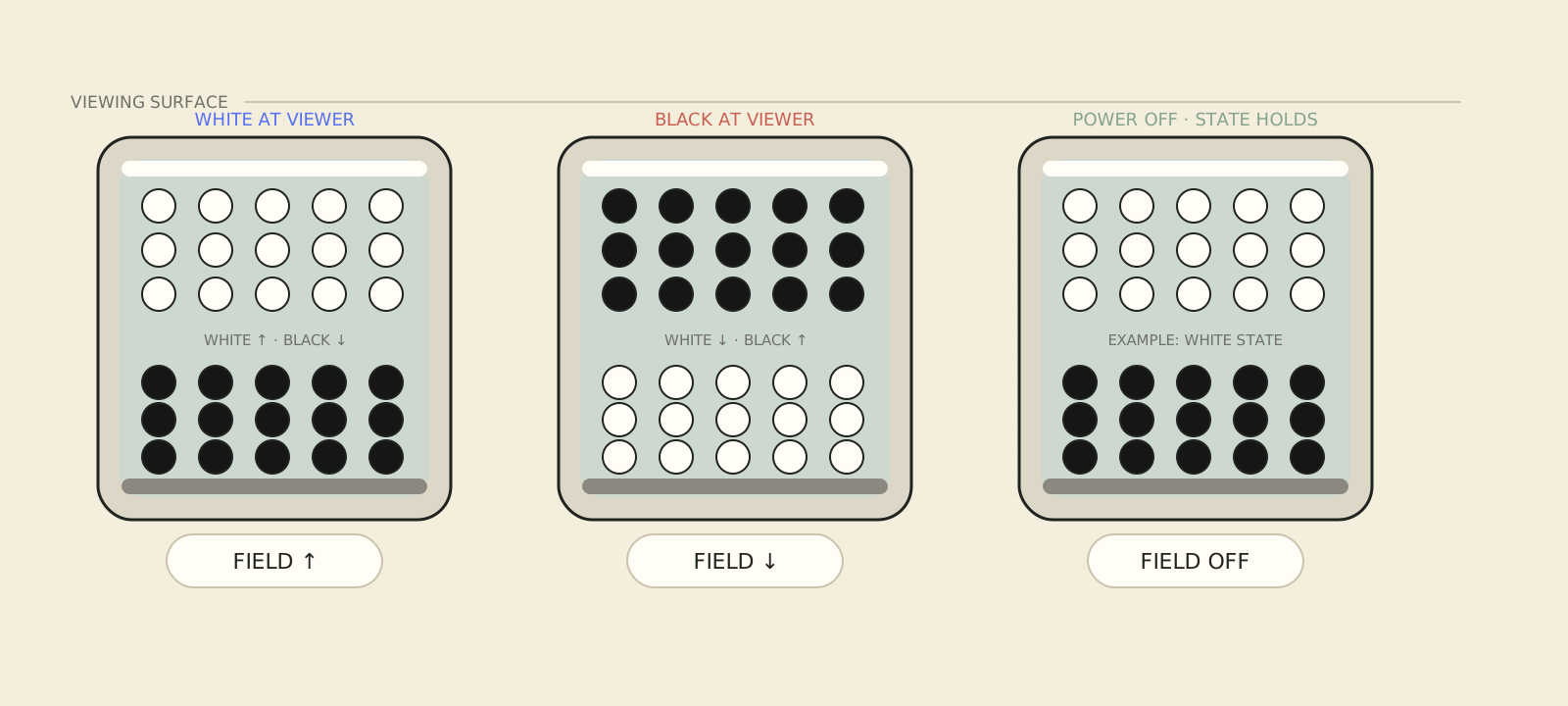
E Ink’s own explanation starts with charged pigment particles suspended in a fluid. Applying an electric field moves selected particles toward the viewing surface. In a traditional black-and-white film, oppositely charged black and white particles trade places. In the family used by Gallery displays, multiple colored pigments occupy every pixel. The image is reflective and bistable: once the particles are in position, the panel can retain the image without continuously refreshing it.
That bistability is the feature and the trap.
It is the feature because a page can sit there for long periods without a 60 Hz stream of replacement frames. It is the trap because “write white to this pixel” is not a complete display command. The controller needs to know where the pixel came from, where it is going, which update mode is allowed, the panel temperature, and what other work is already developing nearby. The answer is not a single voltage. It is a waveform: a sequence of phase codes played over time.
A useful first-order physical model
The exact chemistry and controller model are proprietary, but the first-order physics is useful because it explains why voltage, time, temperature, and history cannot be collapsed into one RGB value.
For two electrodes separated by an effective cell depth , a crude uniform-field approximation is:
Here is the effective particle charge, its radius, the temperature-dependent viscosity of the carrier fluid, and an effective electrophoretic mobility. The equations are an intuition pump, not a Gallery 3 simulator: real cells add particle-particle interactions, wall effects, charge regulation, non-uniform fields, threshold behavior, remnant voltage, and a distribution of mobilities. The foundational microencapsulated electrophoretic-ink paper describes contrast as electromigration of scattering or absorbing microparticles and reports the bistability that makes electronic paper useful.
- Panel temperature
- Matching waveform
- Tuned phases
- Target tone
Cold often needs a longer sequence; warm drive is shorter but still tuned.
Rewind changes this teaching diagram, not a physical display.
This is a qualitative fixed-pulse comparison, not a Gallery 3 predictor. With field and duration held constant, warmer carrier permits farther model travel. Real panels compensate with temperature-selected, multi-polar waveforms.
Same field and duration move pigment least in a cold carrier and farthest in a warm carrier. This is a qualitative raw-cell comparison; real panels select a temperature-specific waveform.
The static diagram shows the qualitative result of one equal pulse from one shared start. A real panel compensates with a temperature-specific waveform.
Even this simple model exposes three engineering facts.
- Pulse area and temperature interact. Travel depends on the time integral of the drive and the fluid mobility, which is why the controller selects a temperature bin and Pluto hysteretically tracks it.
- Color is a separation problem. In a four-particle cell, differently charged and differently mobile cyan, magenta, yellow, and white populations have to be moved selectively. Amplitude, polarity, duration, and prior position become control dimensions; there are no independent RGB subpixels waiting to be assigned intensities.
- Electrical zero is not necessarily historical zero. Dielectric layers, interfaces, and previous pulses can leave remnant voltage or trapped charge. E Ink patents explicitly discuss reducing remnant voltage and compensating drive behavior, which is one reason balanced multi-phase sequences and previous-state knowledge matter.
The display is therefore better written as a hidden-state system:
is the inaccessible physical state: particle distributions, residual charge, and material polarization. is the applied phase sequence, is temperature, represents the exact panel and material parameters, and is the reflectance a camera can observe. Flutter supplies a desired next reflectance, not . Pluto cannot recover the complete hidden state from a framebuffer, so it keeps , the strongest correlated software history it can maintain from accepted work: previous and target levels, accepted transitions, temperature bins, color history, completion, and spatial debt.
A waveform lookup is consequently closer to this than to “set pixel”:
- Policy
- Waveform
Here is a quantized controller level and is maintained software history. They are correlated proxies for the hidden physics, not observations of . The policy chooses a safe action class; the supplies the approved panel-specific phase recipe.
The renderer does not solve the fluid dynamics; it preserves enough history to choose a validated transition from the controller’s legal action space.
Interactive exhibit 02 / Maintained history
Identical pixels can need different drives.
First use the visible shade alone. Then reveal the software record Pluto actually has.
Holding the same gray.
Holding the same gray.
Step 2 · Reveal Pluto's maintained history Step 2 · Maintained history revealed Software memory, not an x-ray of the glass
Not observed: internal charge or pigment position.
Authored schematic · illustrative phase classes
Same train on both
F forward C clearing back-phase
Ready. Both authored pixels show the same normalized mid-gray.
A history-aware renderer also remembers how each pixel arrived there; Pluto does not claim to observe the panel's internal physical state.
Fixed authored scenario for explanation, normalized for clarity. Values and phase trains are not panel measurements or proprietary waveforms.
The vendor describes multiple update modes because the trade-off is fundamental. E Ink says matrix displays can update only changing regions and that different modes serve different update requirements. Its Gallery 3 announcement gives useful product-level context: black-and-white, fast color, standard color, and best-color operations occupy very different time ranges. Those headline numbers are not a benchmark for Pluto’s exact panel path, but they explain why “just redraw everything” is the wrong default.
Three consequences shaped the whole architecture.
First, is a first-class object. If only a cursor changed, the renderer should not make 1.6 million pixels do work.
Second, quality is a scheduling decision. A fast interaction update may be the right first answer, followed by a more faithful regional settle. A full quality waveform is not simply “better”; it is slower and may visibly flash.
Third, the panel has hidden state. The framebuffer contains desired RGB values. It does not contain the complete physical state of the pigments or the history required to produce the next exact transition. A screenshot can prove what software submitted while the glass still proves it wrong.
That last point led to a rule I now use throughout Pluto:
A successful function return is not a visible result. A waveform label is not a visible result. A framebuffer hash is not a visible result. For physical-display claims, the final authority is the panel.
Four kinds of truth
It helps to name the states that would otherwise get blurred together.
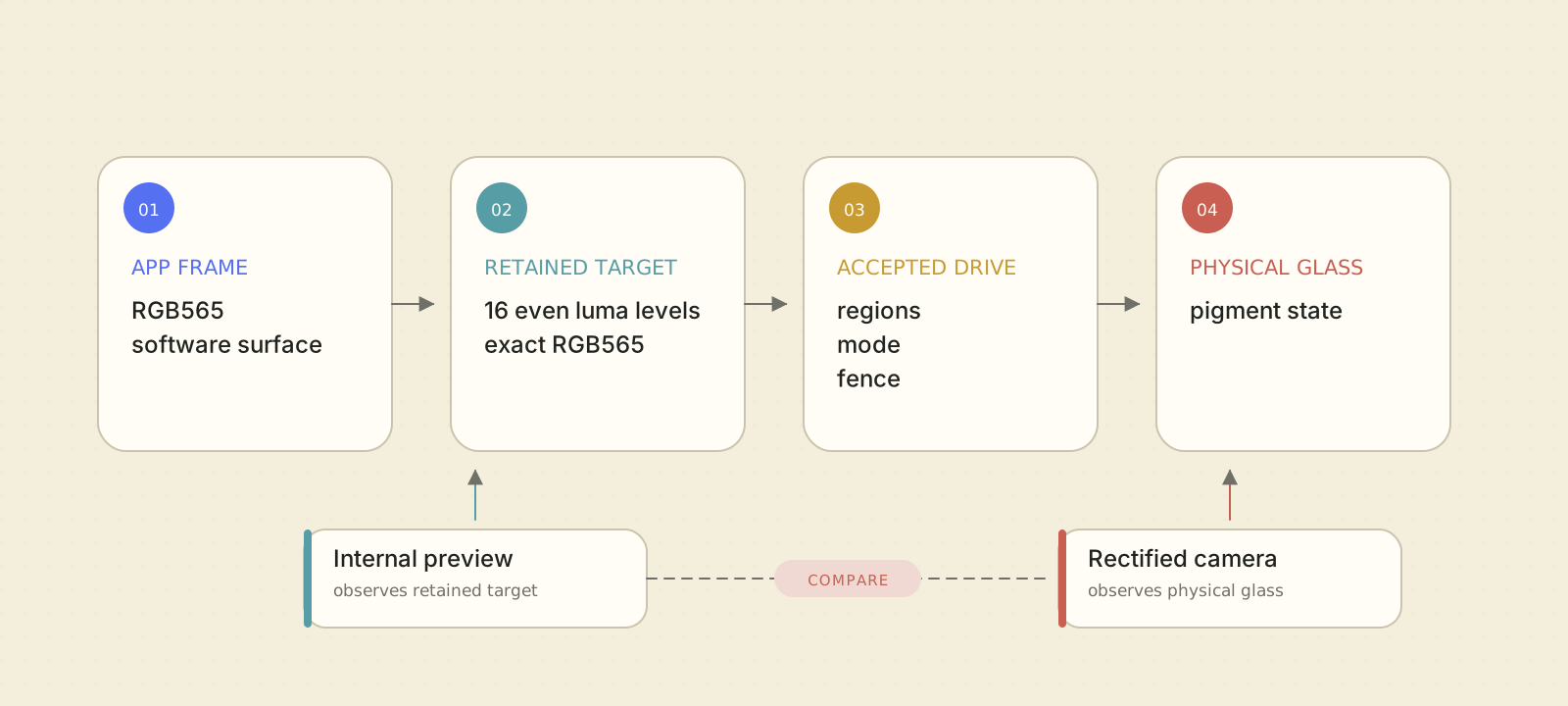
- Flutter truth is the app’s current software surface: the pixels Skia rasterized after the widget tree changed.
- Renderer truth is Pluto’s retained, quantized and classified model of that surface. It includes exact where needed, the post-quantize level plane, chroma transitions, tile statistics, and debt ledgers.
- Presenter truth is what the display engine accepted: regions, modes, temperature bins, current-to-target transitions, phase progress, and completion fences.
- Glass truth is optical reflectance on the physical tablet.
The first three can be asserted in deterministic tests. The fourth needs instrumentation.
This separation prevented a lot of confident nonsense. If a test says the presenter emitted a Full request, that proves dispatch. If a page-flip arrived, that proves a phase reached the scan latch. Neither proves that a residual image is gone, a color is correct, or a stroke appeared within some claimed number of milliseconds. Those are optical questions.
The four truths also explain why Pluto retains more state than a desktop compositor. It is not enough to save the newest RGB image. If an app switch hands the panel to another process, the incoming process must either inherit a correlated display history or deliberately return the glass to a known state. Guessing is how stale pixels become permanent.
The custom Flutter embedder
Flutter is unusually suitable for this experiment because the engine has a low-level embedder API. Flutter’s architecture places an embedder beneath the engine: it supplies the platform event loop, rendering surfaces, input, lifecycle, task runners, display metrics, and platform messages. The official embedded support page describes custom embedders as the path for low-powered devices and new operating environments, and the engine’s embedder header is the actual contract.
Pluto uses that contract directly rather than hosting the ordinary GTK Linux shell.
The engine is pinned. At the time of writing the repository targets Flutter 3.44.4 and Dart 3.12.2. The plain embedder libraries, matching snapshot tools, data, metadata, and hashes live under the engine pin in the repository. A normal checkout verifies these artifacts; it does not quietly substitute a system Flutter install.
At startup, the native host does roughly this:
- inspect the device and requested app mode;
- open a presenter for the physical display;
- create Pluto’s frame renderer and software compositor;
- configure custom task runners and the event loop;
- expose platform channels for device, settings, pen, touch, sensors, lifecycle, and app control;
- load either the app or the explicitly authorized debug bundle;
- start Flutter with a software renderer and Pluto’s compositor callbacks;
- publish readiness only after the presenter accepts the first real frame.
Flutter’s own architectural overview describes the engine as the rasterizer and the embedder as the glue to the underlying platform. Pluto keeps that boundary, but the “window” below the engine is a retained e-ink transaction system.
Software rendering by design
Pluto’s rendering path does not use a GPU. The embedder configures Flutter’s software renderer and supplies software backing stores. The current three-slot pool avoids allocating a full surface for every frame. On the Move the logical surface is , with each row aligned to 64 bytes:
When Flutter presents a view, Pluto accepts a single root software backing
store, observes whether Flutter says it updated, and reads Flutter’s paint
region as a candidate set. If Flutter produced an unchanged frame, the
compositor can short-circuit it. If it changed, the backing store becomes a
PlutoFramePacket for the e-ink renderer.
The key phrase is candidate set. Flutter paint bounds are useful, but Pluto does not trust them as display truth. A bug, an over-broad bound, or a sub-quantum change must not turn into incorrect panel work. The next stage verifies actual bytes.
The tile pipeline: damage after quantization
The core raster path works on 32 × 32 tiles. At 954 × 1696 logical pixels that is roughly 1,590 tiles, including clipped edge tiles. This is small enough for precise ledgers and large enough to keep scheduling metadata compact.
Interactive exhibit 03 / Exact damage
How a rough paint region becomes exact damage
One worked example, computed end to end: a pen tick, the app's generous paint bounds, and the tile pass that verifies which pixels really changed.
Send exact damage, not a bounding box
6 changed tiles become 3 tight update pieces; unchanged pixels inside a piece ride along as null transitions.
A Source → luma, honestly
0xED66 → R 239 · G 174 · B 49
(77·239 + 150·174 + 29·49) ≫ 8 = 179
Integer BT.601 matches the renderer's convert path. Chroma 190 clears the floor of 12, so this pixel also flags a later colour-capable pass.
B One threshold per position
179 × 15 ÷ 255 = 10.53 → between levels 20 and 22 (of 16 even levels, 0–30)
In this crop, 15 of 32 ink cells lift to 22; 17 stay at 20. The highlighted pixel has t = 20, so it lifts to 22. Absolute panel coordinates make unchanged content re-dither byte-identically: no shimmer or false damage. This 8 × 8 ranking is an illustrative stand-in; Pluto's shipping threshold field is 64 × 64 blue noise.
C Diff after quantization
window: 32 of 64 px differ · tight bounds 8 × 5 px
The grey divider is repainted too. The same RGB565 at the same positions makes identical bytes, so all 6 divider tiles verify clean. With the untouched paper, 30 of 36 candidates disappear.
D Same luma, different hue
0xCB0B → luma 128 0x5CE9 → luma 128
Both hues make the same 14/16 pattern, so the level diff reports 0 px. The retained RGB565 mirror plus the chroma flag still catches the hue change for a colour-capable settle.
Even inside an update piece, a pixel whose target equals its current state is a null transition - the panel only works where evidence says it must.
Six stages. Step at your own pace; nothing advances on its own.
Static reading: a pen tick and a repainted divider sit inside generous app paint bounds. The rough 184 × 170 px bound snaps outward to a 192 × 192 px region and nominates 36 tiles (36,864 px). Each candidate keeps its RGB565 source, derives integer BT.601 luma (0xED66 → 179), dithers onto 16 even levels with position-keyed thresholds, and is compared with the retained plane. The repainted divider re-quantizes byte-identically and drops out; only the tick differs: 764 changed pixels in 6 tiles, sent as 3 tight update pieces (3,177 px). A same-luma hue swap (0xCB0B ↔ 0x5CE9, both luma 128) shows 0 px in the level diff and is caught instead by the chroma branch and the retained RGB565 mirror.
TilePass turns broad paint bounds into exact damage: nominate candidate tiles, verify them with a deterministic quantize-then-diff against retained history, and send only tight changed pieces. Changed pixels, tiles containing changed pixels, and physical display updates are three different granularities of the same worked example.
For each , , or candidate tile, TilePass
derives and chroma, applies an absolute-coordinate blue-noise threshold,
compares the post-quantize result with retained state, and emits exact changed
pixels with tight dirty bounds before updating the ledger.
This order matters. The diff happens after quantization. If an RGB value changes but maps to the same panel level, there is no work to schedule. Conversely, when exact color matters, Pluto also compares the retained source so a same- hue change does not disappear.
The dither is keyed by absolute panel coordinates, not by the top-left corner of the damaged rectangle. That gives the pass a useful property: processing a crop produces the same bytes as processing the full frame and then cropping. Without rect-local determinism, two equivalent partitions could create different dither patterns, continually dirtying their own seams.
The ledger stores:
- the current quantized level for each logical pixel;
- a packed chroma bitplane;
- per-tile histograms and significance statistics;
- current and previous row hashes used to verify scrolling;
- selected old-row samples to reject hash-only false positives;
- a monotonically increasing content epoch.
There is also a retained mirror for exact-color and warm-handoff work. The first frame after a new configuration or cross-app handoff is deliberately reconciled across the full surface. Flutter’s paint bounds only say what the app repainted; they do not prove untouched pixels already belong to that app.
Damage is geometry plus meaning
The renderer merges exact dirty pieces, then runs a classification ladder. It does not choose a waveform by asking the app “is this text?” because ordinary Flutter apps should not need a Pluto-specific annotation language.
The ladder uses measured pixel and tile behavior:
- a pure black/white or very small level histogram can take a fast rail path;
- repeated overlapping looks like motion and favors Fast;
- large, intense one-off change is treated differently from sustained churn;
- hot accretion such as typing and long-quiet one-shot changes favor text quality;
- verified scroll translation can pace the moving body while immediately revealing the newly exposed strip;
- color transitions remain marked for a color-capable fidelity path.
The classifier is not infallible semantic AI. It is deterministic policy over actual renderer evidence. That is intentional: the display path must remain bounded, testable, and safe when an app behaves strangely.
One of the easiest e-ink mistakes is to classify a big transition as “Full because it is important.” Pluto did that early on. It produced aggressive whole-screen flashes during ordinary view changes, then delayed tile-shaped flashes as the settle planner tried to repair the same event. Camera video made the problem obvious. The policy was changed so large achromatic transitions generally use non-flashing text-quality work; Full is kept for real color development, explicit resets, and carefully delimited cases.
Those exact regions become the scheduler’s input.
A scheduler, not a queue
Once regions have a class, RegionScheduler arbitrates them. The
four public classes are:
- Fast for the shortest, rail-like interaction path;
- UI for responsive mixed interface content;
- Text for settled regional grayscale quality;
- Full for the strongest fidelity/development work.
On the tested Move table, Fast and UI currently share one decoded mapping, so the exhibit that follows compares three timing contracts, not four.
The durations in the exhibit below are approximate panel occupancy derived from decoded phase counts at about 85 Hz for the tested Move table at 25 °C (bin 4), not end-to-end latency or universal backend mappings.
Interactive exhibit 04 / Waveform timing
One scan clock, three refresh contracts
Three regional jobs admitted on the same 85 Hz scan tick. Each class plays a different number of 11.76 ms phases, so the same clock buys three very different amounts of panel work.
- Fast + UI mode 7 · fast/partial family11 × 11.76 ms ≈ 129 ms baseline occupancy
pluto uses it for pen preview and UI chrome - two scheduler classes sharing one table row · buys shortest occupancy, no flash · costs history debt accrues for a later settle
- Text mode 1 · GL16 family31 × 11.76 ms ≈ 365 ms ≈2.8× the Fast occupancy
pluto uses it for settled text and stills · buys flash-free grayscale · costs keeps more residual history than a flash
- Full mode 2 · GC16 family86 × 11.76 ms ≈ 1,012 ms ≈7.8× the Fast occupancy
pluto uses it for the flashing settle that pays down accumulated ghosting · buys strongest fidelity · costs a visible flash; the region is busy throughout
- table
- installed Move waveform table · grayscale mappings · temp bin 4 (≈25 °C) - colder bins run longer tables
- clock
- durations derived, not benchmarked: phases × 11.76 ms from the measured 85 Hz scan
- names
- inferred from drive signatures - the binary has no mode-name strings; Pluto maps Fast/UI → 7, Text → 1, Full → 2
- scope
- occupancy of the updated region - not end-to-end latency, not screen size
Fast finishes first because it promises least and banks history debt. Text pays ≈2.8× for flash-free grayscale. Full pays ≈7.8× for the flashing settle that repays what the fast lanes borrowed. All three are regional - a class is a quality decision, not a screen-sized one.
Completed comparison shown: Fast + UI ≈129 ms (11 phases), Text ≈365 ms (31), Full ≈1,012 ms (86) on one shared, phase-segmented scale - durations derived from the measured 85 Hz scan clock, phase counts from the decoded waveform table. Scripting only adds a replay.
The names are logical promises, not universal hardware mode numbers. A presenter maps them to capabilities of its backend and panel.
The scheduler has several independent lanes:
- pen-correlated Fast preview;
- pen-correlated Text or Full truth;
- user ordered by earliest deadline inside class bands;
- background settle work under a constant-bandwidth budget;
- serialized full-screen reset rails.
Newer content wins. If two pending updates cover the same region, the scheduler can collapse them while preserving the oldest enqueue time to prevent starvation. If a new update overlaps in-flight work, it checks content epochs: that is not newer can be absorbed, while genuinely newer pixels wait, retarget, or split according to presenter capability.
Classes do not merge blindly. Two rectangles may only coalesce when the result does not create an unacceptable amount of unrelated optical work, and different fidelity classes do not become one accidental Full rectangle. Pen truth keeps exact residual pieces rather than filling the empty space in a bounding box.
The scheduler also uses one monotonic clock. This sounds mundane, but an early version compared Flutter presentation timestamps with a steady clock inside the scheduler. They are different time domains. Mixing them can create negative ages, broken deadlines, or immortal work. Every policy timestamp now comes from the same monotonic source.
The presenter boundary
The renderer stops at a called PlutoPresenterOps. A present
request contains:
- a settled surface;
- one or more disjoint rectangles;
- a refresh class;
- flags for pen priority, required truth, settle, or reset stages;
- a monotonically increasing frame ID.
The presenter reports geometry, preferred format, alignment, color capability, whether it controls refresh classes, whether it has real completion callbacks, and whether downstream accepts overlap supersession.
That interface supports host preview and two on-device strategies.
qtfb: delegate color, surrender control
The presenter writes into the stock shared framebuffer and sends
complete or partial update messages to . It preserves the existing
stock color pipeline, which is valuable, but the protocol Pluto has today only
expresses ALL or PARTIAL. It does not carry an
immutable per-update Pluto refresh class and it does not return optical
completion.
This means can truthfully advertise color and downstream overlap supersession, but not precise waveform-class control. Pluto uses conservative timer estimates for fences. Unsupported sparse maintenance is accepted as a no-op; otherwise a nominal one-pixel repair mask could turn into a complete rectangle downstream.
is a good example of why capability flags matter more than backend names. The same scheduler policy must fail closed when a transport cannot express the operation.
direct SWTCON: own the waveform path
The direct presenter opens the display’s path, decodes the installed
.eink waveform, tracks temperature bins, converts target states,
runs a per-pixel engine, builds scan planes, and waits for actual device
completion.
A waveform record is a stack of current-state-to-target-state matrices. For a given mode and temperature bin, each phase answers: for a pixel currently in state A and aiming for state B, which hardware drive code should this scan emit? The sequence is played once, with each pixel advancing independently.
The Move’s installed table is sparse, not a generic “32 gray levels in every mode” grid. In the decoded 25 °C record used during development:
- the fast mode is an 11-phase bilevel path with drivable endpoints near the rails;
- the text mode is a 31-phase path with an eight-level target lattice;
- stronger full/development modes run longer and support different targets.
The exact mode map differs when the exact-color pipeline is enabled, so Pluto does not bake those observations into the app API. It asks for Fast, UI, Text, or Full and lets the presenter prove that the selected mode can actually drive the desired target.
Temperature matters because particle mobility changes. The presenter monitors the panel-oriented hardware sensor, chooses the waveform bin from the installed thresholds, and applies hysteresis so readings near a boundary do not flap between tables. Each accepted admission carries its selected bin; a successor cannot accidentally borrow a different one halfway through an update.
The phase engine keeps per-pixel active state and supports safe same-mode retargeting. It builds the next scan plane as soon as an admission makes work available instead of waiting for an arbitrary timer. kernels accelerate the transition sweep, operation compaction, and phase deposition, while scalar implementations remain the byte-exact reference.
Completion is also stricter than “the CPU finished building.” A callback is not released until the corresponding phase reaches the final scan latch. That distinction matters at rotation, app handoff, pixel reset, and shutdown: reusing state before the last scan is visible can corrupt the assumed current-state plane.
Rendering color on e-ink requires a different pipeline
The Paper Pro Move’s Canvas Color display is based on Gallery 3. E Ink describes Gallery 3 as a four-particle cyan, magenta, yellow, and white platform. reMarkable describes its Canvas Color pipeline as producing eight native writing colors from those particles and mixing them spatially for more tones.
That is a fundamentally different problem from mapping RGB to one of 31 grayscale tone targets from 0–30, before the selected waveform mode and temperature legalize that target onto a drivable lattice.
Interactive exhibit 05 / The colour question
Two questions for the same panel
The same pixels, asked two ways. Grayscale asks each pixel for a brightness; exact colour asks for a reachable pigment state. One is a lookup - the other is a control loop with memory.
0x3410 · 0xA232 - different hues, identical luma 106
the boundary vanishes - both become tone target 6
the boundary survives - position picks each pixel's state
See how the marked pixel gets there
The marked pixel, both ways
0x3410 expands to R 49 · G 130 · B 132. The renderer computes luma 106, then tone target 6. Mode and temperature legalize that target before the waveform drives previous → target.
ct33 finds a tetrahedron around (49, 130, 132). Four weighted vertices interpolate eight threshold slots; this pixel's position selects state 0–7. Persistent A/B history then chooses the safe drive. The mosaic is the idea, not a decoded ct33 byte.
Where both answers land
One pixel contains mixed populations of four pigment species. Each mosaic square is one whole pixel state - never an RGB subpixel or filter dot.
The mosaic uses native writing-state colours as an illustration. The device instead combines ct33, a 64 × 64 position field, and A/B history to select and safely reach state 0–7.
grayscale path - shipping on the Move today exact colour - active + fail-closed on the verified Move profile camera/log accepted transitions + warm handoff · calibrated hue not claimed
Grayscale needs the previous and target brightness. Exact colour also needs calibration, position, and per-pixel A/B history. The Move advertises it only after fail-closed validation. Both answers drive the same four-pigment glass.
Both answers shown together: the shared patch is teal 0x3410 beside magenta 0xA232, deliberately chosen with the same integer luma 106. Asked “how bright?”, every pixel answers luma 106, becomes tone target 6, and is then legalized for the active mode and temperature - the hue boundary vanishes, exactly as it should. Asked “which colour state?”, the illustrative state mosaic preserves the boundary - while the real ct33 path selects state 0–7 using tetrahedral interpolation and the position field. The safe drive for each pixel depends on its persistent A/B history, and the complete exact-colour pipeline is active and fail-closed on the verified Move profile. Camera and log evidence accepts exact-colour scene transitions and warm handoff; this teaching approximation does not claim calibrated hue accuracy. Scripting only adds the question toggle.
Pluto therefore has two direct paths:
The grayscale path converts to , applies a text-oriented tone curve, legalizes the target onto the selected mode’s actually drivable lattice, and indexes the waveform with previous and target levels. This path is mature, directly controlled, and useful for fast interaction even on the color panel.
The exact-color path is admitted as one complete, fail-closed capability. It loads all required blobs, validates the installed waveform modes and temperature records, performs tetrahedral interpolation in a 33 × 33 × 33 RGB cube, compares the interpolated values with a position-keyed threshold field, and produces a compact color-state plane. A recovered selector and delta stage then combines that source with persistent A/B history before the waveform engine emits transitions.
The A/B history is not an implementation detail that can be reconstructed from the last visible color. Two internal states may be optically similar yet lead to different safe successors. That is why the warm-handoff bundle carries the full interleaved history allocation, not merely a screenshot.
The verified Move profile now requests exact_color=1. The presenter advertises
color only after the safe Fast signature and complete color pipeline validate;
if either fails, startup fails closed instead of silently routing the admitted
session through another backend. A hash-bound device run accepted six exact-color
warm handoffs without a cold clear, with camera frames and presenter logs binding
each transition to its completed scan latch. That accepts transition and handoff
continuity, not calibrated hue or color-chart accuracy. remains a separate
stock-owned color backend, not the fallback for failed direct-color admission.
This status distinction is important. “The code can map color” and “the physical panel produced correct color across repeated transitions” are different claims.
Making pen strokes feel faster without guessing what you will draw
Pluto uses the pen’s recent movement to estimate the small part of the screen the nib is likely to reach next. It does not predict the stroke, brush, colour, or action. It predicts where the next real app-drawn pixels may appear, so the renderer can give that area priority.
That distinction matters. The app might be drawing with a pencil, erasing, highlighting, moving a selection, or doing nothing at all. Flutter still owns every visible pixel. If the app draws nothing, Pluto draws nothing.
Pluto predicts where to look for changed pixels, not what those pixels should be.
Interactive exhibit 06 / Pen priority
The hint says where to look - never what to draw
Pluto sweeps a focus corridor around the nib. A match with fresh app damage authorizes a bounded window in the nearest connected dirty component; unrelated damage keeps its normal schedule.
Fast preview, then truth
The authorized window gets a fast grayscale preview, then the app's newest truth: Text for achromatic changes, Full for chromatic changes on color glass. Neither pass invents a stroke.
Canvas zoomed for clarity: predicted tip travel is ≤16 px and ≤11.76 ms; correlation radius is 36 px in contact and 48 px in hover.
predicted tip ≤1 scan frame · ≤16 px correlation radius · 36 px contact · 48 px hover matched window ≤20% · unrelated damage stays normal truth · achromatic Text · chromatic Full
Flutter owns every pixel. The corridor only tells the renderer where to look first. With no matching damage there is no pen-priority update; unrelated app damage still follows its normal display schedule.
Final step shown: a match between the focus corridor and fresh app damage authorizes a bounded window inside the nearest connected dirty component. That window gets a fast grayscale preview, then Text truth for achromatic changes or Full truth for chromatic changes on color glass. Predicted tip travel is ≤1 scan frame and ≤16 px; correlation reaches 36 px in contact and 48 px in hover. The corridor contains no pixels: unmatched damage such as the badge stays on its normal schedule, and no match means no pen priority. Scripting only adds the step-through and second scenario.
How it works
- Read the motion. Pluto receives the pen’s position and contact state from Linux , then uses its recent speed and direction to project the nib by at most one 11.76 ms screen scan and 16 pixels. The swept focus corridor used for association has a 36-pixel contact radius and a 48-pixel hover radius.
- Let the app draw. The same pen event goes to Flutter as normal. The app decides whether it means pencil, eraser, highlighter, selection, or nothing. The prediction contains no pixels and cannot draw by itself.
- Check the real result. After Flutter renders, a corridor intersection is an association gate, not a crop. Pluto follows the closest verified eight-neighbour connected dirty-tile component and authorizes one bounded, axis-aligned update window. Unmatched residual stays on the normal path; with no match, the pen-priority lane adds no presentation.
- Show fast, then exact. Pluto first shows a quick grayscale refresh of those real app pixels, then immediately follows it with Text truth for achromatic changes or Full truth for chromatic changes on color glass. Both passes use the app’s newest pixels; neither invents a stroke.
A reversal, pause, tool change, app handoff, or device disconnect clears the prediction. The fast area is also capped at 20 percent of the panel, so a scroll or animation near the pen cannot promote the whole screen into the fast lane.
Pluto tests this behavior across hover, erasing, same-brightness colour changes, broad brushes, drawing back over a stroke, scrolling, rotation, and completion races. The important invariant stays the same: no matching app pixels means no pen-priority update, unrelated app remains normally scheduled, and Pluto never draws a system-owned stroke.
Why e-ink screens need occasional full refreshes
Fast electrophoretic updates trade fidelity for time. Repeated partial changes can leave residual influence from earlier states. The display literature has treated ghost reduction as waveform design for years; for example, Yang et al. describe the competing goals of fewer flickers, shorter drive time, and reduced ghost image, while E Ink’s own color-driving patents describe clearing sequences intended to remove prior-state information.
At the application layer, “ghosted: true” is not a useful model. Debt is spatial and historical.
Pluto keeps tile ledgers for accepted drive exposure:
- ghost debt rises with Fast and UI work and is repaid by quality work;
- stress/deep debt records stronger controller concerns;
- chroma pending marks real color content that still needs a color-capable fidelity pass;
- pigment-hygiene debt is a conservative, non-decaying proxy for broad repeated fast/UI drive on the physical pigment panel.
Only work that the presenter actually accepts contributes. A dropped or superseded request cannot charge the glass for a drive that never happened. Partial tile coverage carries fractional remainder so repeated small updates do not round down to zero.
The ordinary response is regional. After a tile remains undamaged for a quiescence window, the settle planner clusters eligible debt, orders the clusters by debt and saliency, and submits Text or Full work through the same scheduler. Re- re-arms the timer, so an animation does not flash-thrash mid-motion. It settles after it rests.
When a broad achromatic backlog exists, the planner can make one full-screen Text repayment instead of a mosaic of delayed rectangles. Full remains regional for actual chromatic content. This policy was learned the hard way: an earlier sparse “sparkle” experiment looked safe in code but could not transport the per-pixel mask, so it produced repeated rectangular refreshes on glass. That path now fails closed.
Automatic Ghostbuster
Regional work is not enough for every long-running session, so Pluto has a native-only controller for rare full-screen maintenance.
The exhibit’s 6 × 9 maps and fading remnants are authored explanations, not session telemetry. Production uses clipped pixel area on its real 32-pixel tile grid and does not sense optical cleanliness. Current device acceptance verifies serialized rails, completion, and retained-content restoration; it does not quantify ghost or pigment removal.
Interactive exhibit 07 / Ghost maintenance
Two ledgers decide one quiet reset
Drive history - never a camera - chooses Blink, Bleach, or Both. This ghost-only walkthrough shows why Blink repays one plane while leaving the other untouched.
Fast restore repays ghost only
A full-screen Fast restore repaints the newest retained content. Blink repays the ghost plane to 0% qualified area; the pigment plane remains at 13% because only Bleach/Both may repay it. New debt accepted during the run survives, and success starts a ten-minute cooldown.
authored optical sketch · not a measurement
- black
- white
- restore Fast · newest truth
Ghost debt Text / Full may repay
≥ 6,144 Q8 repaid
Pigment proxy Bleach / Both only
≥ 12,288 Q8 Blink leaves it
authored 6 × 9 downsample · production uses clipped pixel area on 32 px tiles
- no touch contact
- pen out of range
- 500 ms input grace
- 300 ms visible quiet
- scheduler idle
- not suspended
- foreground + eligible
- no reset / backoff / cooldown
accepted Fast +768 Q8 · UI +512 Q8 → both planes ghost · ≥6,144 on ≥55% → Blink 3 · Text/Full may repay pigment · ≥12,288 on ≥35% → Bleach 5 · Bleach/Both repay both planes both → 7 · direct SWTCON · 10 min success cooldown
These authored maps explain software policy, not session telemetry. Acceptance verifies serialized rails, completion, and retained-content restoration; it does not quantify optical ghost or pigment removal.
Final ghost-only step shown: Fast black, Fast white, then a Fast restore of the newest retained content. Accepted Fast adds 768 Q8 and UI 512 Q8 per fully covered tile to both 32 px planes. Ghost latches at 6,144 Q8 across 55% and accepted Text/Full may repay it through 35%; pigment latches at 12,288 Q8 across 35% and ordinary quality work never repays it. Blink repays ghost only; Bleach/Both repay both, and debt accepted during a run survives. Eight quiet gates include no touch, pen out, input grace, visible quiet, idle scheduler, not suspended, foreground eligibility, and no reset/backoff/cooldown. Once a black rail is accepted, its matching white and retained restore are mandatory. The maps and fading remnants are authored explanations, not telemetry or optical proof; acceptance verifies sequencing and restoration. Scripting only adds step-through.
The controller owns two preallocated debt planes on the 32-pixel tile grid. The conservative initial thresholds require both substantial per-tile history and broad display coverage:
| Reason | Per-tile high threshold | Required display area | Low water |
|---|---|---|---|
| ghost / Blink | 6,144 Q8 | 55% | 35% |
| pigment proxy / Bleach | 12,288 Q8 | 35% | 20% |
Those thresholds are intentionally above the ordinary regional settle lines. A two-frame screen change should not trigger a disruptive global sequence.
When a reason latches, it still cannot run until:
- all raw touch contacts are gone;
- the pen is out of range;
- a 500 ms input-release grace has elapsed;
- visible work has been quiet for at least 300 ms;
- every scheduler lane and in-flight update is idle;
- the process is still foreground and maintenance eligible;
- the presenter is not suspended for a system handoff;
- no reset, failure backoff, or cooldown blocks it.
The settle planner gets the first chance to repay debt cheaply. Global work is the fallback at a natural idle boundary.
The rail plans are serialized black, white, and retained-content stages. Depending on the owed reason, the sequence uses three, five, or seven full-screen stages, with the final stronger plans restoring content through a balanced Full request. Flutter raster grants are held during the optical rail transaction, but Dart timers, platform tasks, input observation, and the warm remain alive. A frame that was already rasterizing may update the retained ledger; the final restore reads the newest truth.
Blink success repays ghost debt only. Bleach and Both repay both planes, while debt accepted after a run begins survives in separate scratch planes.
If input races the first optional black stage, the presenter boundary refuses it. Once a black rail is accepted, its matching white and retained-content restore become mandatory safety recovery; later optional cycles may still be cancelled, leaving their debt owed. There are timeouts, a retained-content recovery attempt, exponential retry backoff, and a ten-minute success cooldown. The controller adds no app-facing hint API.
Performance: make the policy cheap enough to stay honest
The Move has a 1.7 GHz dual-core Cortex-A55. The renderer cannot spend tens of milliseconds deciding how to save tens of milliseconds, and it cannot allocate freely on a high-rate pen or presentation path.
The optimization process has been deliberately mechanical:
- record a baseline;
- optimize a named subsystem;
- re-run scalar/ parity and phase-plane goldens;
- run unit, replay, sanitizer, and thread-sanitizer tests;
- rebuild for ;
- separate host timings from device evidence.
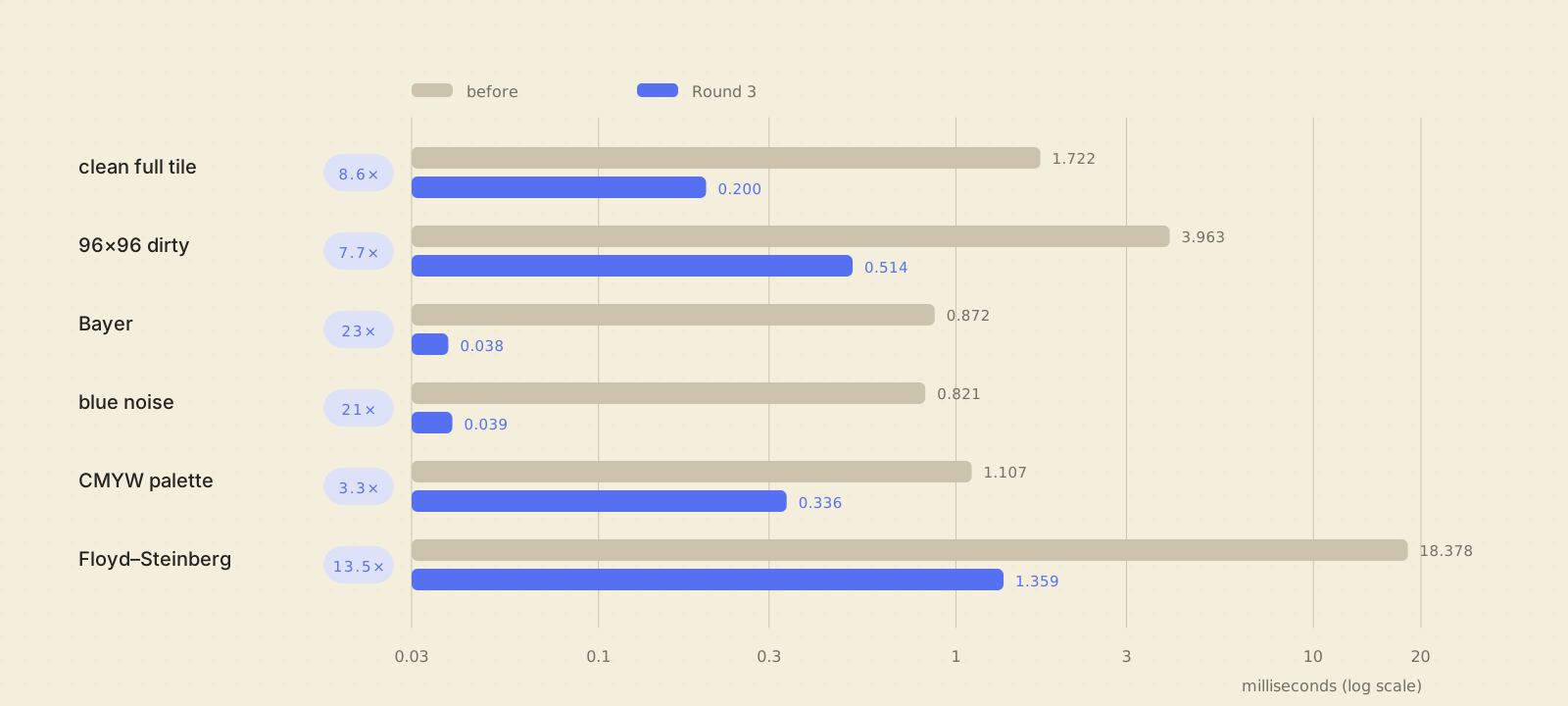
Across the same campaign, the separate presenter fused full-field build improved from 5.225 ms to 1.716 ms (Apple Silicon host-release, p50). It is not plotted because it belongs to the presenter benchmark.
These numbers are not Move timings. The host is substantially faster, and only relative changes are expected to transfer. They are still useful because every optimization is pinned to byte-identical output.
The wins came from unglamorous details:
- diff first so clean tiles skip expensive work;
- fuse conversion, dither, diff, and stats where it preserves determinism;
- use table lookup for conversion;
- keep scalar kernels as the frozen reference;
- precompute legal target maps and color interpolants;
- replace serial sparse compaction with vectorized left-pack;
- write phase rows once instead of template-copy, read-modify-write, copy;
- recycle large admission buffers;
- track active ledger windows rather than scanning zero tiles;
- preallocate scheduler, pen-history, completion, and residual storage;
- trigger builds on admission instead of waiting for the next scan tick.
One optimization campaign also tried a radix sort that was byte-identical and slower. It was reverted. “Native” and “clever” are not performance metrics.
The current presenter benchmarks fit inside one 85 Hz scan-frame budget on the host for the measured build stages. The remaining authoritative questions are device behavior and optical response under real contention. Pluto keeps those as separate acceptance gates.
AOT to run, JIT to build
Flutter development is pleasant because Dart enables hot reload. A tiny embedded runtime is pleasant when it does not ship a development VM and compiler into every production app. Pluto keeps both, but makes the boundary explicit.
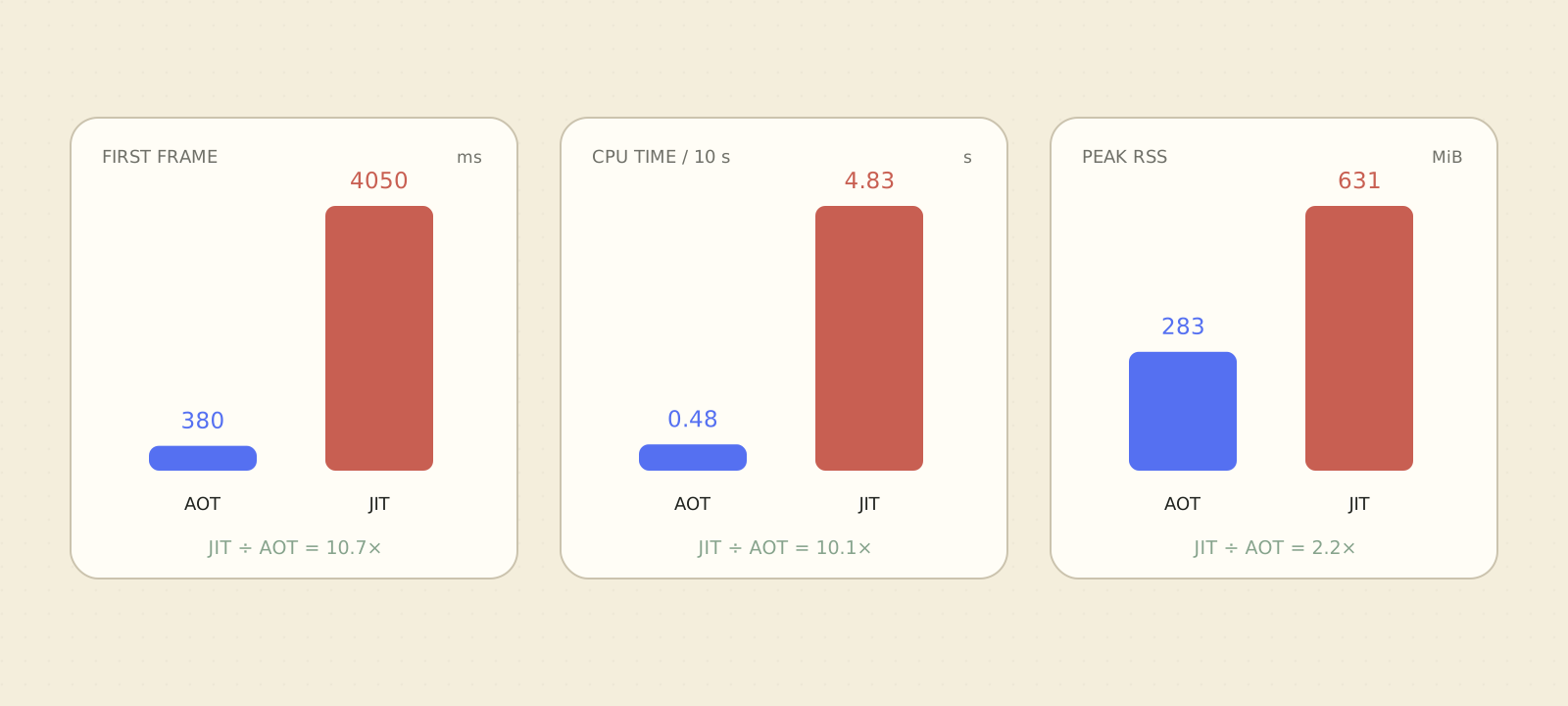
Dart’s platform documentation describes the same split: supports incremental recompilation and hot reload during development; compiles to native machine code for deployed applications.
Pluto has three modes:
| Mode | App payload | VM service | Hot reload | Boot/default eligible |
|---|---|---|---|---|
| release | product AOT app.so | no | no | yes |
| profile | non-product AOT app.so | yes | no | no |
| debug | JIT kernel_blob.bin | yes | yes | no |
Release is the default at build, package, install, run, and provisioning boundaries. Debug must be requested explicitly each time. A debug app cannot become the boot target, and a device without an authorized one-shot debug control will not start it.
Every layout has metadata containing the exact build mode, engine flavor,
target, Flutter version, and engine pin. Release/profile layouts may contain
bundle/lib/app.so and must not contain a kernel. Packages copy
that identity into integrity metadata; installation preserves it; the
supervisor selects the matching engine from the installed record. Relabeling
a debug bundle as release is rejected.
On macOS and x64 Linux, Pluto runs the committed snapshotter inside a Linux/arm64 container. A native Linux host can run it directly. That step creates an app snapshot; it does not rebuild Flutter.
The attached Move benchmark compared the same counter app through the same embedder and a headless PNG presenter:
| Measurement | Release AOT | Debug JIT |
|---|---|---|
| first rendered frame | 380 ms | 4,050 ms |
| user CPU in equal 10 s run | 0.48 s | 4.83 s |
| peak RSS | 290,208 KiB | 646,336 KiB |
Both produced matching first-frame and post-tap output. This is a software startup/render benchmark, not time-to-visible-glass. It established that was the right production default on the A55s while preserving for the development loop.
A normal debug session is still familiar:
pluto build package --debug
pluto install --debug --force build/pluto/app.plap
pluto run --debug dev.pluto.examples.counter
The CLI forwards the and prints the Flutter attach command. Release
uses the same build/install/run shape with --release, except there
is no hot-reload service left running on the tablet.
Warm app switching without a full reset
Pluto remembers two things when you switch apps: where the app was, and what is already on the glass. The Flutter process stays paused in memory, preserving its page, scroll position, navigation, and unsaved UI state. At the same time, the outgoing renderer hands over an exact record of the panel’s current state.
That gives the next app a safe starting point. It can draw only what needs to change instead of first flashing the whole display through a slow black-and-white reset.
- On screen in
- 4.97 s
- On screen in
- 0.67 s
By default, Pluto keeps Home and the three most recently used release or
profile apps warm. A background app receives Flutter’s paused lifecycle,
releases the display, touch, and pen, then stops under SIGSTOP.
Its , heap, navigation stack, and draft UI remain in memory while it
uses no CPU. Only the foreground app owns the hardware.
Debug apps are excluded. Freezing a live development behind the supervisor would make hot reload confusing and unsafe, so debug launches stay cold and one-shot.
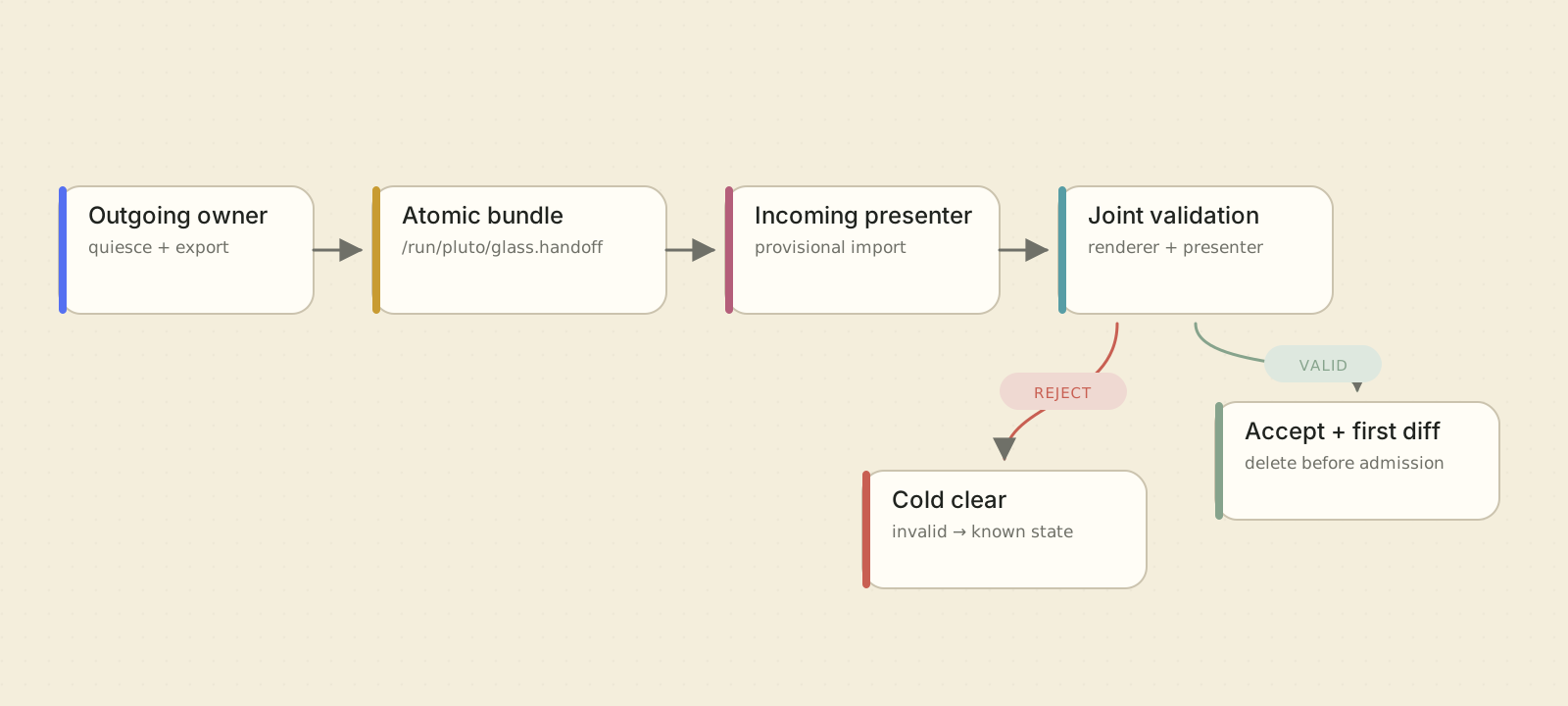
The hard part is not the Dart heap. It is the panel.
At app A’s last frame, the glass contains state derived from app A’s pixels, waveform history, temperature, and unfinished/settled controller state. When app B takes over, it cannot compute exact deltas from its own screenshot alone. The conservative answer is a cold clear. That is safe and visibly expensive.
Pluto’s newer handoff protocol attempts a stricter alternative. The outgoing
renderer first proves that its scheduler, completions, maintenance, input
focus, presenter lanes, histories, and final scan latch are quiescent. It then
stages a schema-v2 bundle under /run/pluto/glass.handoff containing:
- the full Move A/B history allocation, including guard pixels and internal differences that share a visible level;
- PixelEngine DC, stress, rescan, and temperature-bin state;
- the retained frame and quantized level/chroma mirrors;
- classifier, scroll, settle, ghost, stress, chroma, automatic-maintenance, and regional-scheduler state.
This is approximately a 13.5 MB transaction, not a dumped C++ object. Fields are explicitly little-endian. The writer uses a mode-0600 temporary file, file synchronization, atomic rename, and parent-directory synchronization. The reader verifies exact layout and EOF, section sizes, values, geometry, format, waveform and identity, renderer configuration, same boot, a maximum age, and a bounded handoff chain.
Import is provisional. The presenter may seed its core state, but it cannot skip cold clear until the compositor validates and imports the correlated renderer payload. The pair commits together. Before the first content admission, the bundle is durably removed; if removal cannot be proved, the presenter refuses content rather than leave a stale file that a later process could mistake for current glass.
The profile is positively identified as the Move: logical geometry, stride, tile geometry, history geometry, machine string, and SoC must all match. Another device cannot inherit this state because it happens to share a width.
Host serialization benchmarks show the bundle can be encoded and decoded in tens of milliseconds, but serialization speed is not visible app-switch speed. The comparison above is a physical-panel capture bound to the deployed binary and presenter logs: 4.97 seconds to the first visible latch on the cold path, and 0.67 seconds when the same Counter process resumed with a validated handoff. Missing, corrupt, stale, incompatible, or non-quiescent state still takes the cold path.
Warm state is a convenience, never durability. Reboot clears it. Apps still have to save documents and conversations normally.
The camera became part of the test rig
The camera is not part of Pluto itself, and it does not decide how a screen refreshes. I use it during development to record the physical displays and compare the software output with what actually appeared on the glass.
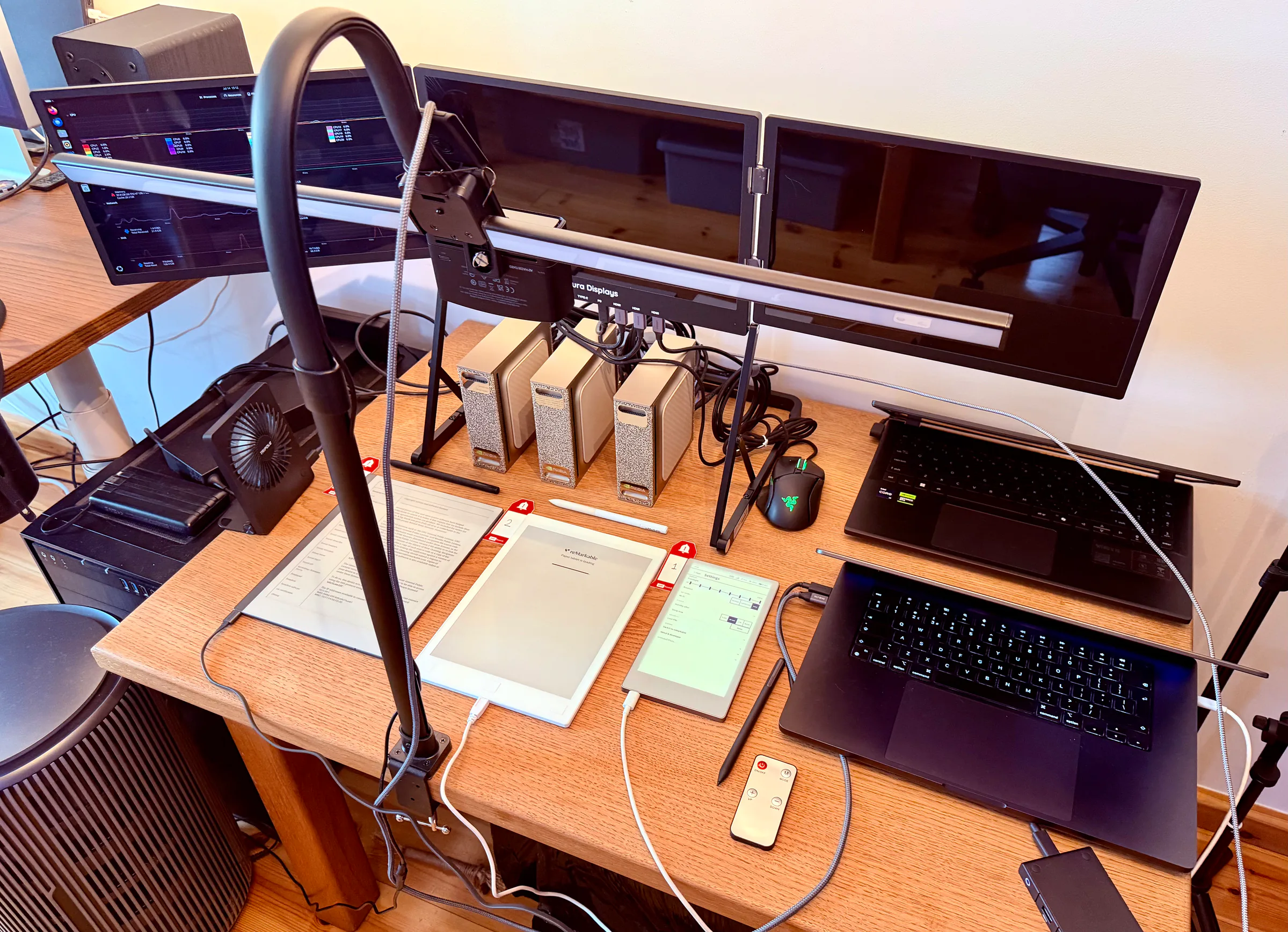
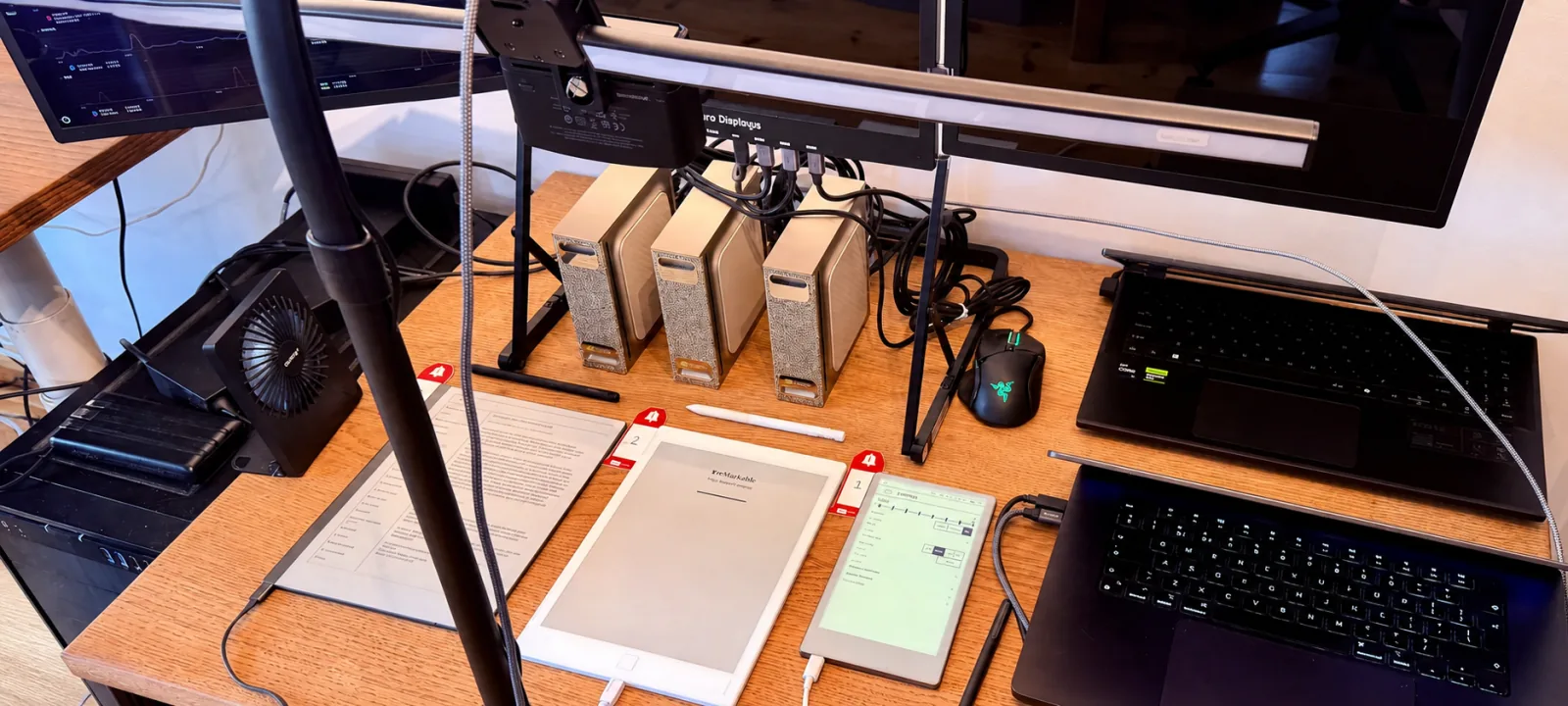
The capture tool turns that busy bench into numbered, calibrated screen regions:
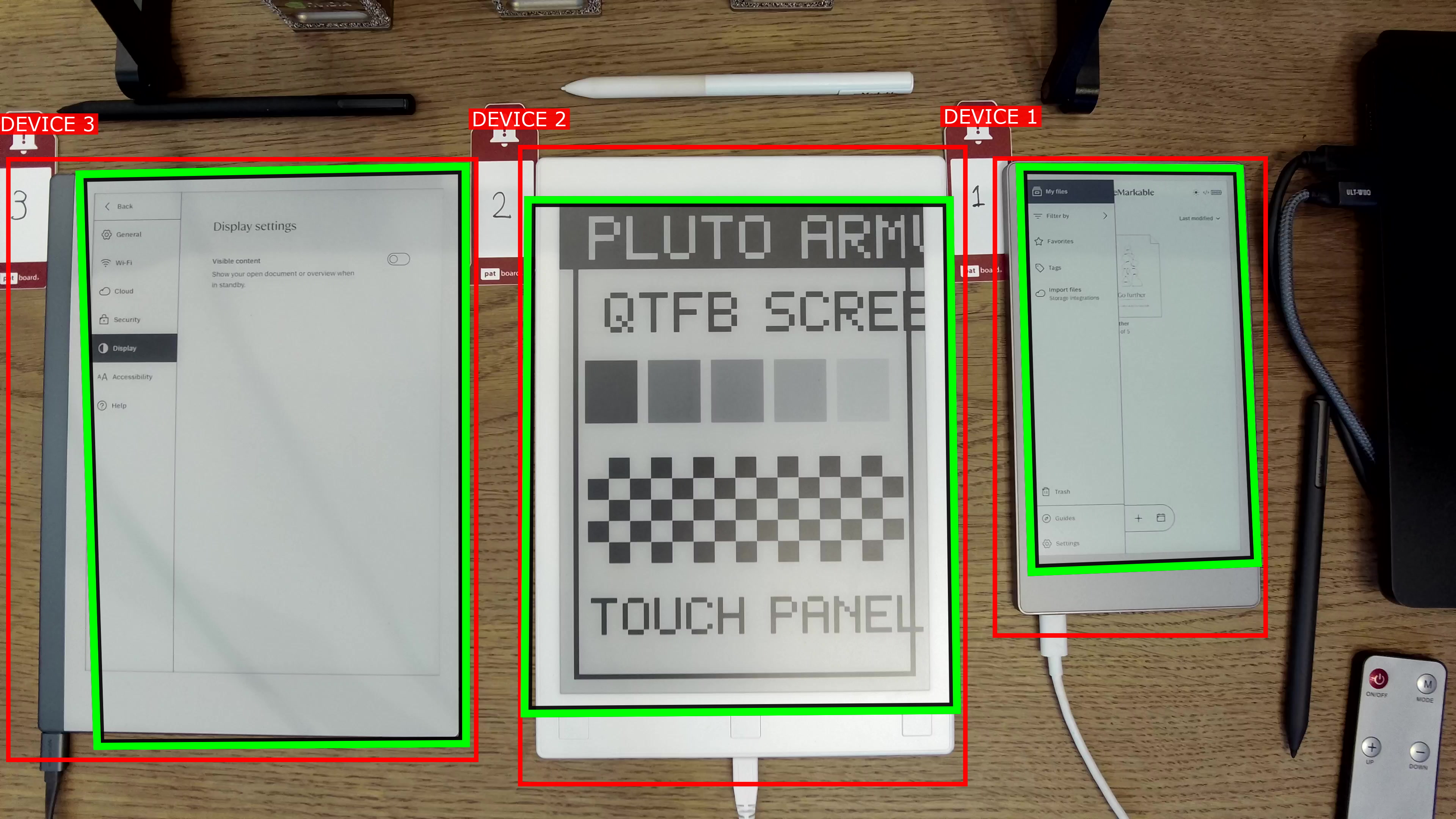
Pluto retains logical and quantized renderer state, and internal host/debug paths can export software evidence. A separate camera helper captures photographs and video of the physical panel. Together these provide two kinds of evidence:
- host-rendered output, traces, or internal quantized previews;
- a photograph or video of the physical panel.
The first catches compositor and pixel-generation bugs. The second catches the optical consequences of waveform-targeting failures, flash timing, stale glass, ghosting, reflections, contrast, and the embarrassing situation where the software is correct and the display is not.
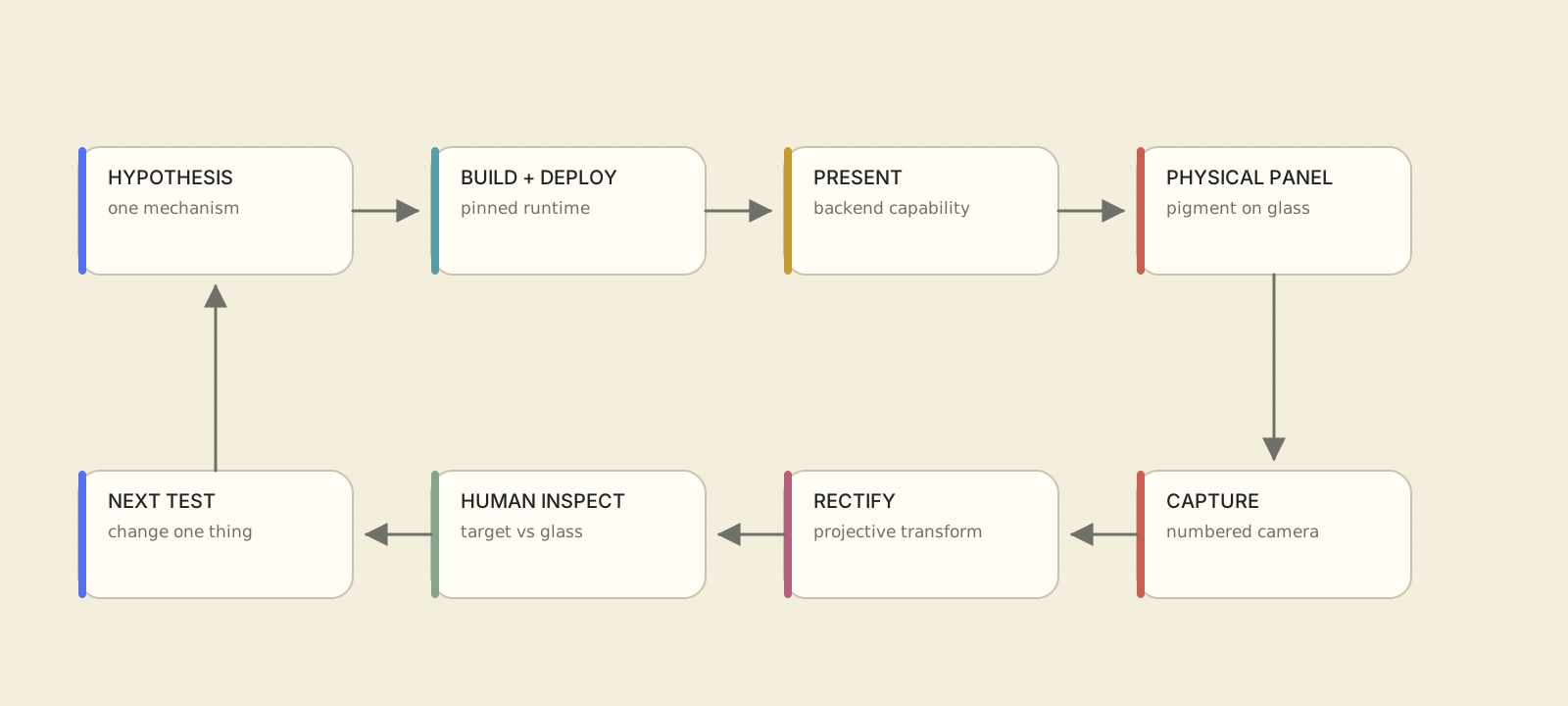
The camera helper under tools/setup/camera turns a fixed workbench
camera into repeatable instrumentation:
- put a red
!Nlabel beside every tablet; - run one configuration pass after the camera or devices move;
- detect the correct camera and numbered screens;
- estimate the full screen box and four ordered display corners;
- render a close calibration crop and refine the active-pixel boundary;
- measure small line slopes for per-device rotation correction;
- verify an upright, complete crop with only a hairline inner-bezel guard;
- store the resulting transforms in a git-ignored local config;
- use local FFmpeg for later stills and videos.
Each device gets its own projective transform, coverage check, rotation
correction, and output geometry. The rig can therefore mix panel sizes. An
identify image preserves the full workbench and overlays DEVICE N;
a screen capture rectifies only the active display into upright portrait.
For a still to count as evidence, the entire active display must be present, text relevant to the assertion must be legible, exposure must be stable, and glare or hands must not cover the region. For timing or ghosting, recording starts before the action and continues beyond the final visible settle.
The next step is to make this evidence more quantitative: locked exposure and white balance, camera-to-panel registration, synchronized device monotonic timestamps, exact emitted phase history, and residual maps computed against expected content. Even then, a metric should augment the video, not erase the need to inspect it.
Apps that force the stack to become real
A platform renderer can look impressive while only drawing a counter. The useful tests are applications that create uncomfortable content.
Pluto Home
The launcher is the shell that boots in place of the stock UI. It owns the app grid, settings, device information, standby, power menu, running-app switcher, and the route back to the stock reMarkable experience. Pluto is not a new Linux distribution and does not replace the stock notes data. The system is provisioned with recovery paths, and a guarded switch back to the stock interface remains available from Pluto Home.
The launcher created some of the best display bugs. System overlays exposed stale retained Home frames. Preview paging forced e-ink-aware snap transitions instead of continuous tween animation. Standby made bistability part of the UX: the intentional final page remains visible while the system sleeps.
Ink
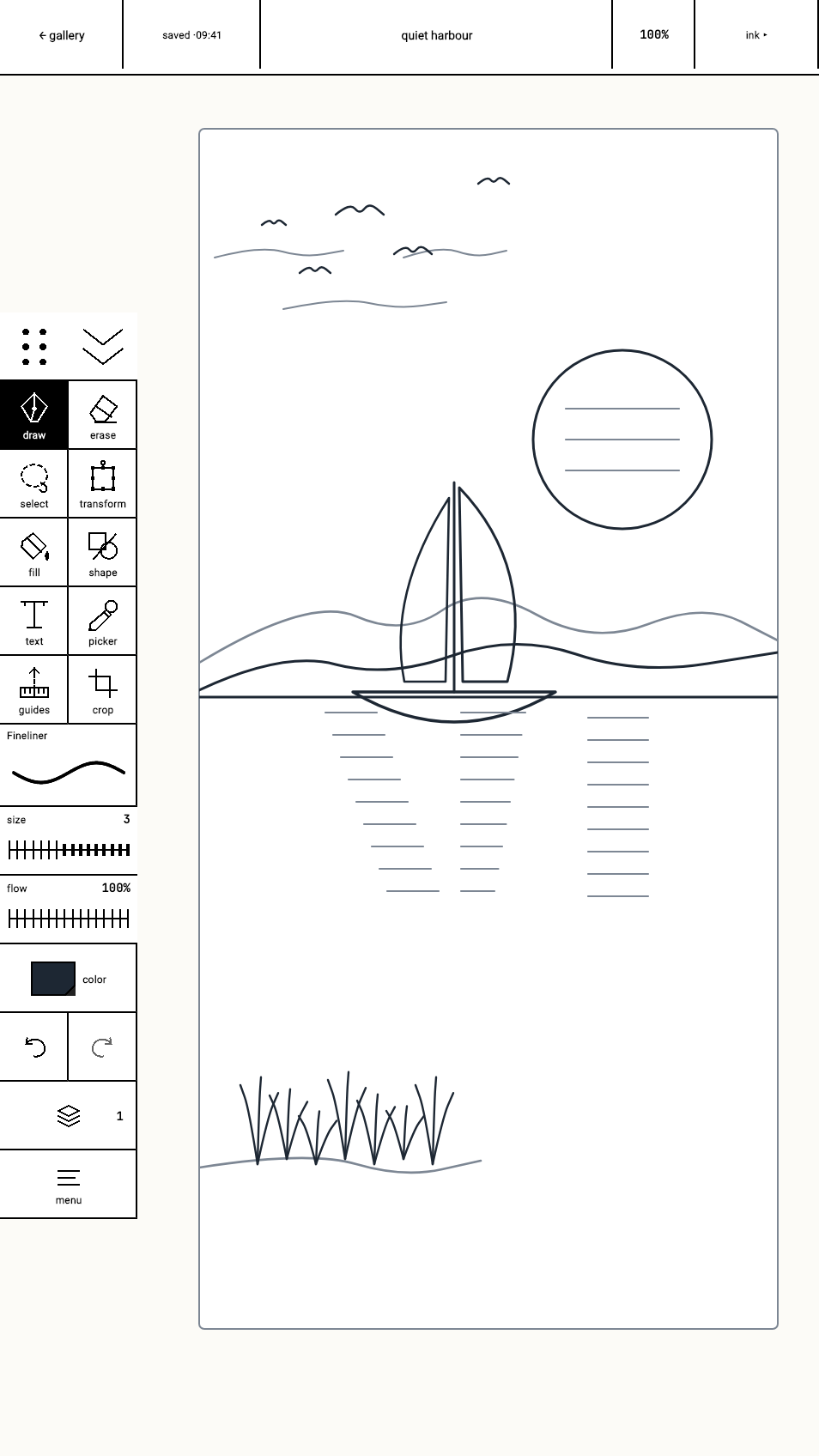
Ink is a real drawing app built in Flutter: pan, zoom and rotation; 16 brushes; layers; selection and transform; fill, shapes, text, eyedropper, guides, reference and crop tools; symmetry drawing; PNG and project export.
It is a renderer stress test disguised as an app. A large soft brush creates many low-amplitude pixels. A white eraser must never become a black native preview. Symmetry creates spatially separated but temporally related . Zoom and rotation mix moving content with pen-local updates. Color-to-white erases require old as well as new chroma truth. Layers produce large scene cuts followed by tiny edits.
The app also proves why Flutter is attractive here. Its interface, document model, gestures, and tools are ordinary Dart and Flutter. The platform-specific work lives below the app boundary.
Paper Codex
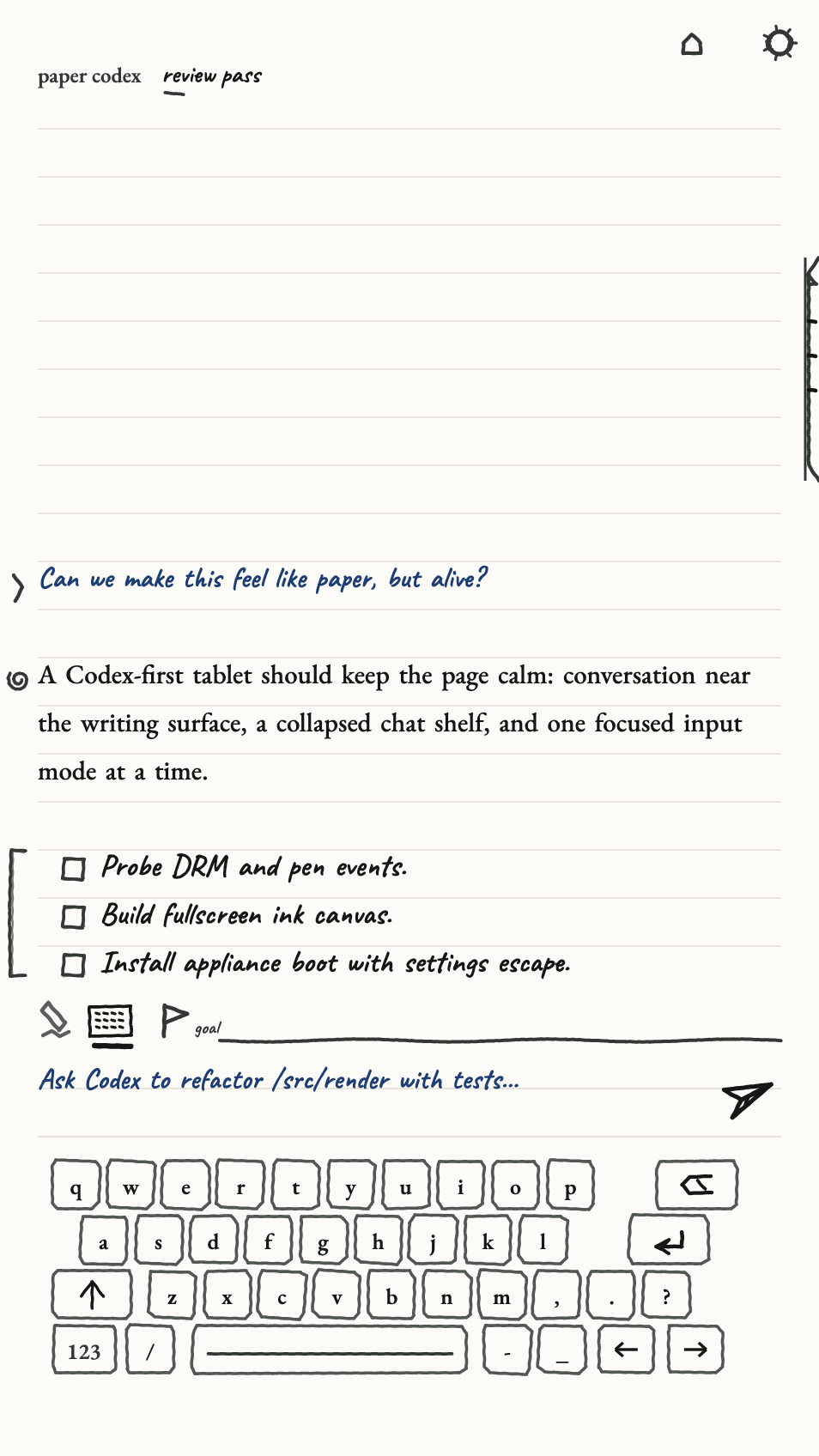
Paper Codex is a notebook-like interface for the Codex CLI. It can create and resume conversations, choose a model and thinking effort, stream structured command events onto a ruled page, accept typed or drawn input, attach a handwritten page image to a prompt, keep a standing goal at the top of the page, and organize pages on a shelf.
The app is useful beyond the demo: a coding agent fits the tablet’s calm, asynchronous nature surprisingly well. Ask a question, let the answer develop, leave the page on glass, and return later. It also pressures warm state, streaming updates, long text settles, handwriting, keyboard input, and background conversation persistence.
If I’m being honest, Paper Codex is still far from ready to become my daily driver for Codex. It may already be my new favourite way to gaslight LLMs though.
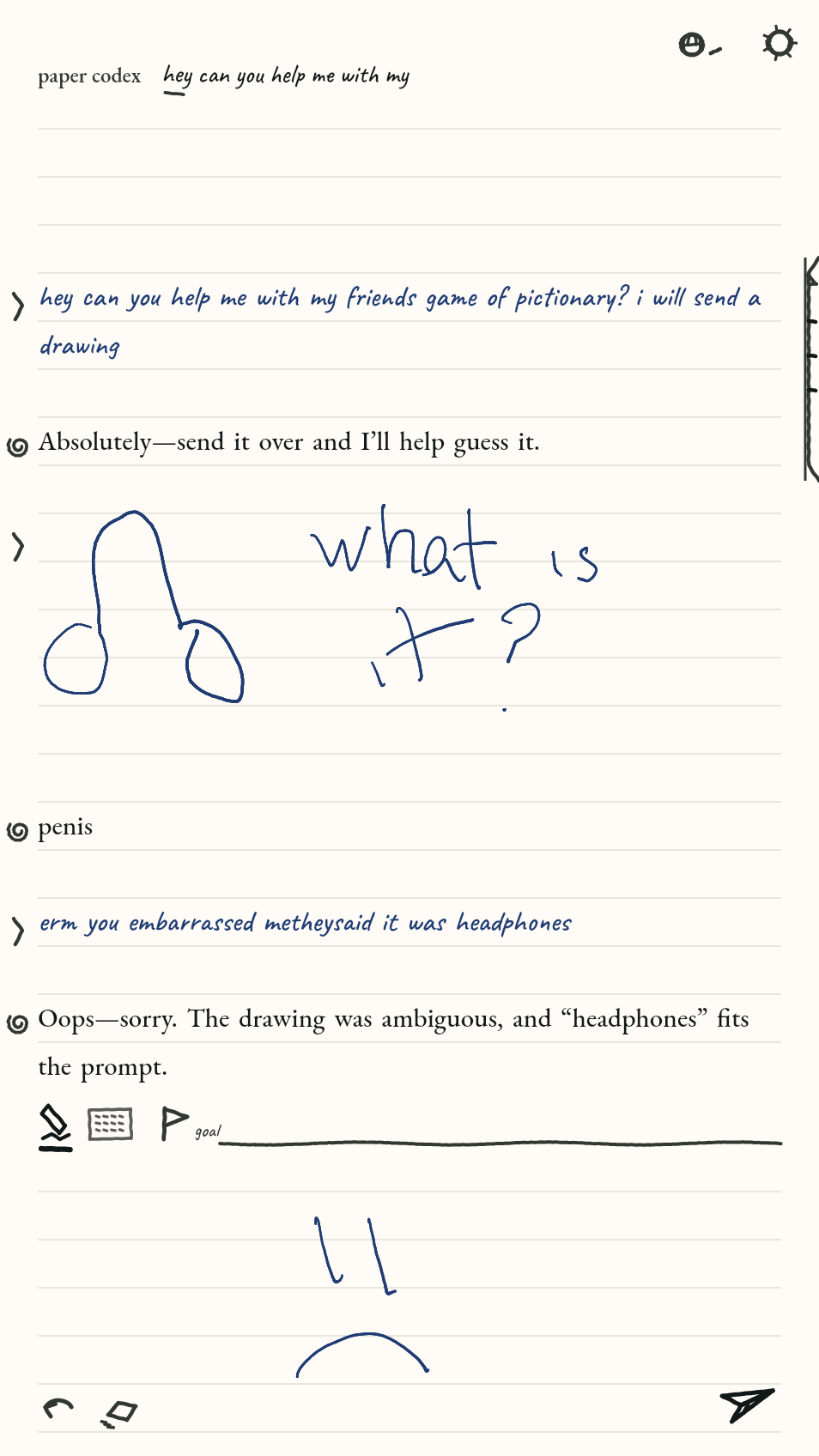
Neither app gets a secret display API. They use Flutter plus Pluto’s ordinary device, session, and paper-UI packages. The renderer infers and schedules it.
Building and shipping an app
An app is a Flutter package plus a pluto.yaml manifest describing
its identity, name, icon, entrypoint, orientation, and display preferences.
After the pinned toolchain is installed, the normal production path is:
cd apps/examples/counter
pluto build package --release
pluto install --device root@<device-ip> \
  --release --force build/pluto/app.plap
pluto run --device root@<device-ip> \
  --release dev.pluto.examples.counter
The CLI also handles device discovery, health checks, provisioning, logs, screenshots, uninstall, cleanup, and explicit debug attach. A packaged app is validated before promotion; install replacement first stops any warm process for the same app so old code cannot resume after its files change.
Provisioning is transactional and reversible. The device supervisor has a fallback and dead-man path for returning to stock if Pluto fails to boot. Display-service restarts are guarded because reMarkable’s service start-limit can turn repeated experiments into a device reboot. Hardware work is batched, not sprayed at the tablet.
The release-only invariant is deliberately boring: nothing outside explicit debug flows may put a kernel, debug engine, or on the boot path.
What’s next?
For now, I’m still focused on the platform itself: making Pluto faster, more stable, and easier to trust across all three supported tablets. That means binding every run to hashes and logs, capturing locked before-and-after sequences, measuring device p99s, and continuing to close the gap between “present accepted” and “glass verified.”
Once I’m comfortable that the foundations are solid, I can spend more time building apps, which is the fun bit. I’d love contributions there too, whether that means new app ideas, experiments, or complete Pluto apps.
An app ecosystem made for paper
I want Pluto apps to be normal Flutter apps with paper-aware defaults: calendars, readers, dashboards, long-form writing, music notation, field tools, ambient status surfaces, and small single-purpose utilities that benefit from a screen which persists.
The ecosystem should not make each app learn waveform mode numbers. The platform should expose stable intents such as orientation, refresh profile, pen, and device services. Native policy should keep the panel safe.
A virtual optical panel: an e-ink simulator
Framebuffer replay is useful but incomplete. A more ambitious offline model would consume exact drive history, temperature, prior hidden panel state, and geometry, then predict optical reflectance over time. It would let renderer policies be compared on recorded workloads before any new action reaches real glass.
That is a future research tool, not a production controller. Any learned online policy would still need a bounded, allowlisted action space and a deterministic safety layer.
A CNC rig for repeatable pen testing
A Genmitsu 4040 Reno CNC is on its way to me. Once it arrives, I plan to turn it into a safe, repeatable stylus rig for Pluto: the delightfully excessive version of drawing the same line twice.
The first target will be Ink. I want to replay identical strokes at controlled paths and speeds across builds, capture input timing and the camera-visible result, and compare time-to-visible ink, line continuity, curves, and settling end to end. That should make pen and drawing improvements measurable instead of relying on how a quick hand test feels.
I will post the rig, the failures, and the first Ink comparisons as it comes together. Follow me on Bluesky, X, or LinkedIn if you want to see the results, plus whatever other dumb or weird experiments I inevitably find for the machine once it arrives.
A local AI workbench
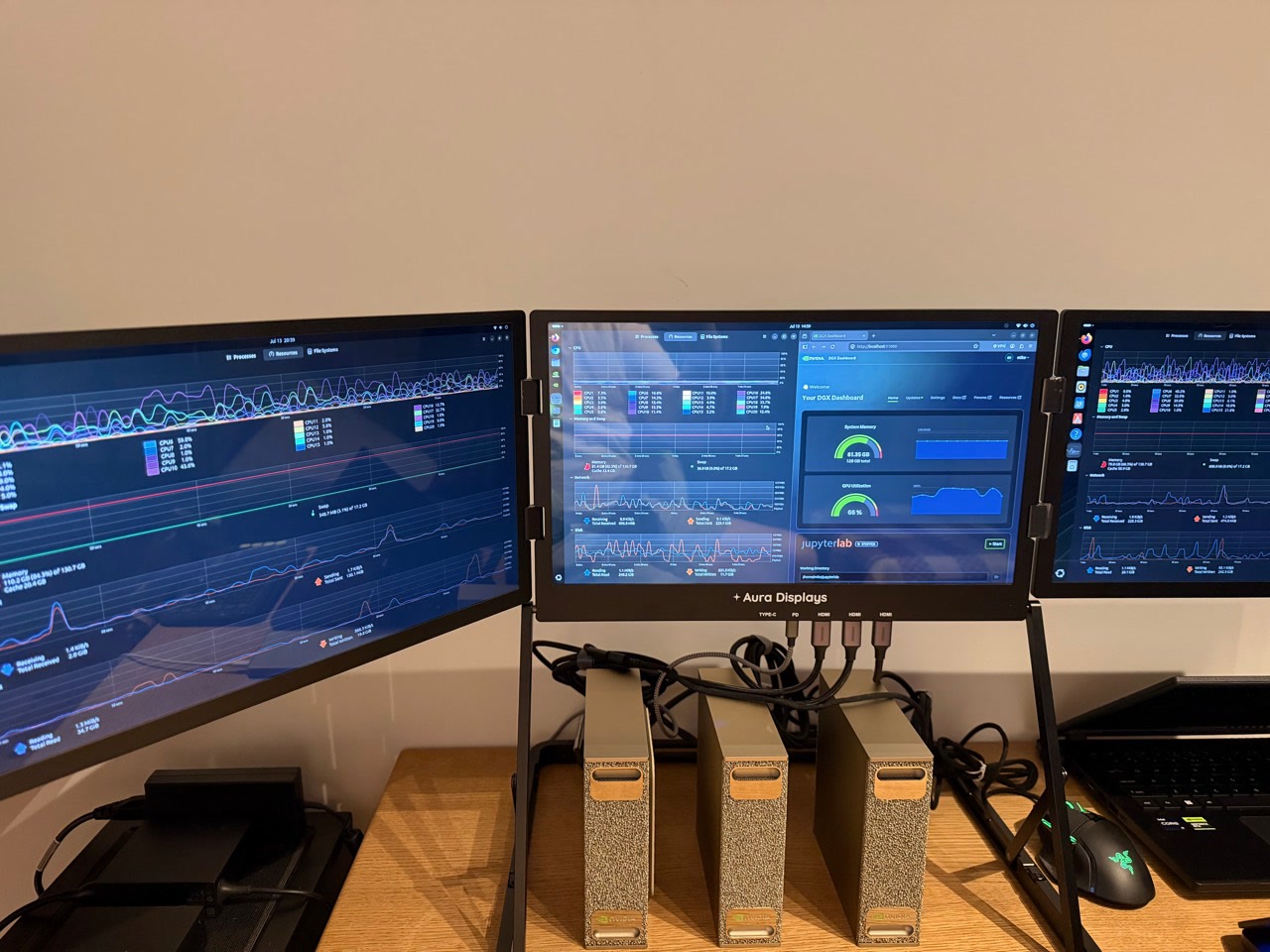
The machines in the photograph are a separate local-AI experiment. I am exploring which fine-tuning use cases are genuinely useful enough to pursue on the eventual four-node setup, but that work is still early and deliberately open-ended. There is no fixed model, training recipe, or Pluto feature to announce yet. I will write about it when there is something concrete enough to show.
Primary references
- Flutter, Embedded support for Flutter and architectural overview.
- Flutter Engine, embedder API header.
- Dart, Dart Native: JIT and AOT.
- E Ink, How electronic ink works.
- Barrett Comiskey et al., “An electrophoretic ink for all-printed reflective electronic displays”, Nature 394 (1998).
- E Ink, Gallery 3 launch and update-mode overview.
- reMarkable, Paper Pro Move hardware specifications.
- reMarkable, How Canvas Color mixes four pigments and native colors.
- Linux kernel, input event codes and pen hover/contact semantics.
- Shang-Han Yang et al., “Ghosting Reduction Driving Method in Electrophoretic Displays”, SID Symposium Digest of Technical Papers 43 (2012).
- E Ink Corporation, US 12,307,989: Driving sequences to remove prior state information from color electrophoretic displays.
- E Ink Corporation, US 9,881,564: Electro-optic displays with reduced remnant voltage and WO 2023/167901: Temperature compensation in electro-optic displays.
Pluto implementation notes
- Renderer optimization log
- Pen-aware fast rendering
- Automatic Ghostbuster
- AArch64 AOT runtime
- Warm app pause and resume
- Real-device camera capture
- Getting started
Pluto is an independent community project. It is not affiliated with, endorsed by, or sponsored by reMarkable AS. reMarkable and related names and marks belong to their respective owners. Modifying a device carries risk; use the documented recovery paths and proceed at your own responsibility.
Article glossary
- qtfb
- A shared-memory framebuffer bridge used by reMarkable's AppLoad system. Pluto writes pixels into it, then asks the stock Xochitl display stack to update the e-ink panel.
- SWTCON
- SWTCON, reMarkable's software timing controller, is the userspace display layer that turns target pixel states and a selected waveform into the timed electrical phases sent to the e-ink panel.
- evdev
- The standard Linux input event interface Pluto reads for pen, touch, buttons, and other hardware events.
- ct33
- reMarkable's 33 × 33 × 33 colour calibration data. Pluto interpolates between sampled RGB values, then combines the result with a position-dependent threshold pattern to choose the compact pigment state.
- Xochitl
- reMarkable's stock application shell and display owner. On cooperative Pluto installs it remains running and performs the final panel update work.
- AppLoad
- The community extension Pluto uses on reMarkable 1 and 2 to launch external apps cooperatively inside the stock interface.
- RGB565
- A compact 16-bit pixel format that stores red in 5 bits, green in 6, and blue in 5. Pluto uses it for colour framebuffer and handoff data.
- ACeP
- Advanced Color ePaper, E Ink's full-colour electrophoretic display technology. It produces colour by moving several differently charged pigment particles within each pixel using carefully timed electrical waveforms.
- DRM
- Linux's Direct Rendering Manager display interface. Here it is the kernel path Pluto uses to present prepared scan planes to the display controller, not digital-rights management.
- damage
- The region of a rendered frame that changed and may need sending to the display. Tracking damage lets Pluto update only the affected pixels instead of refreshing the whole e-ink screen.
- JIT
- Just-in-time compilation. Dart compiles code while the app is running, which enables hot reload but keeps compiler and runtime machinery on the device.
- AOT
- Ahead-of-time compilation. Dart is compiled to native machine code before deployment for faster, more predictable production startup without hot reload.
- ELF
- Executable and Linkable Format, the standard Linux binary format for executables and shared libraries. Pluto packages each AOT app as an ELF shared library named app.so.
- ICU
- International Components for Unicode. Flutter ships ICU data for Unicode text handling, locale rules, segmentation, and formatting.
- LUT
- A lookup table: a precomputed mapping used instead of recalculating a result. Here Pluto looks up the installed panel waveform for a refresh mode, temperature bin, previous pixel state, and target pixel state.
- NEON
- Arm's SIMD (single instruction, multiple data) vector extension. It lets Pluto process several pixel values in parallel, accelerating format conversion and renderer kernels.
- AArch64
- The 64-bit Arm execution architecture used by the Paper Pro Move and its native Pluto toolchain and binaries.
- ARMv7
- A 32-bit Arm architecture used by the reMarkable 1 and 2, which need a different Pluto runtime build from the 64-bit Move.
- XRGB8888
- A 32-bit pixel format that allocates eight bits each to an unused X channel and to red, green, and blue.
- Gray8
- An 8-bit grayscale pixel format where each byte represents one shade from black to white.
- VM service
- Dart's debugging connection to a running app. Flutter tools use it to inspect the process and drive development features such as hot reload.
- C ABI
- A C-compatible binary boundary that defines how functions are called and data is laid out. Pluto uses it to keep the renderer independent from presenter implementations.
- isolate
- An independent Dart execution context with its own memory and event loop. Keeping an app's isolate alive preserves its in-memory UI and draft state while Pluto pauses the process.
- Q8
- A fixed-point count with eight fractional bits, the raw unit of Pluto's per-tile drive-exposure debt ledgers. Counting fractionally lets partial tile coverage accumulate instead of rounding down to zero; it is internal bookkeeping, not a physical measurement.
- p99
- The 99th percentile: 99% of measurements are at or below this value, while the slowest 1% are higher.
- CRC-64
- A 64-bit checksum used to detect accidental corruption in serialized data. It is an integrity check, not encryption.
- luma
- A brightness-like value calculated from colour channels. Pluto uses it when converting RGB pixels to grayscale.